
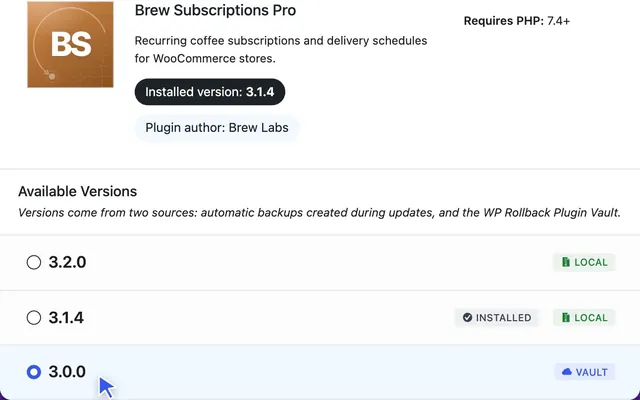




I’m pleased to announce the release of WP Rollback Pro to the WordPress world. This new premium version has been in discussion for many years and is now finally a reality! The biggest new feature is that you can now rollback premium WordPress theme and plugin versions.
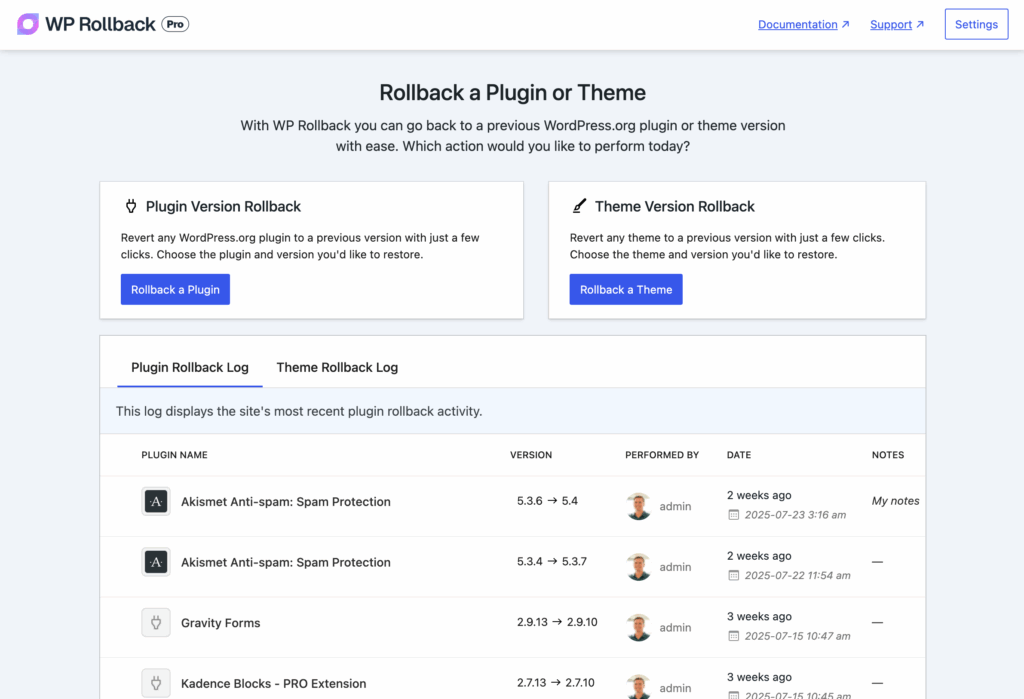
Premium Theme and Plugin Rollbacks are Here
Solving the problem of pro plugin and theme rollbacks required us to think about how rollbacks work within the plugin. Before version 3.0 of the free WP Rollback, the plugin relied entirely on WordPress.org’s APIs to pull version data and other information. Premium assets are not sold on WordPress.org and are not available (typically) in any public repository or API.
We solved the problem of premium asset rollbacks by hooking into the WordPress update system and storing an archive of the currently active theme or plugin in the wp-content/uploads/wp-rollback directory for a potential rollback at a later date.
The archiving occurs in both the WP Rollback Free and Pro plugins. The difference between the two is that WP Rollback Pro allows you to use the intuitive UI to roll back (or forward) versions of your premium plugins and themes — something that previously required manual file management and technical expertise.
In the near future, expect to see options to control the number of versions stored, where they are stored, for how long, and to clear out the archives.

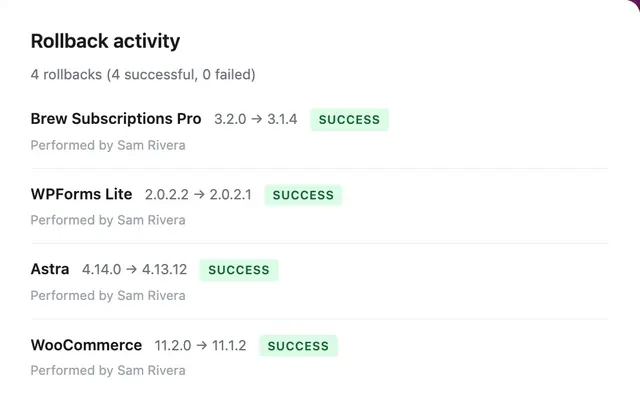
Rollback Activity and Notes
Let’s say you notice an issue with something on your website — for instance, a Gravity Form has stopped being submitted correctly, and there’s a JavaScript error. The problem could be with the core Gravity Forms plugin or a third-party plugin.
Typically, this requires you to test rolling back a few plugins to isolate the version that caused the issue to occur. WP Rollback Pro makes your life easier by ensuring you are more informed about the previous rollbacks that have occurred for the plugin, what version changes occurred, who performed the rollback, and any manual notes left by the admin.
This enhanced visibility means you can quickly identify patterns, avoid repeating problematic rollbacks, and maintain better communication across your team when managing multiple WordPress sites.
Version Integrity Checks
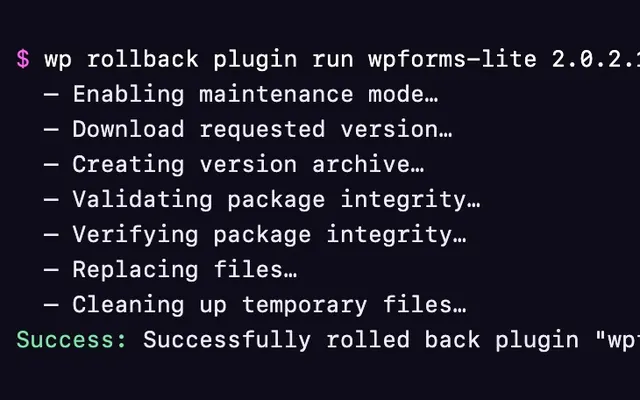
You may notice a new UI when performing a WordPress plugin or theme rollback with WP Rollback’s latest version. Under the hood, there’s a lot more going on than there used to be. Rather than solely relying on the built-in WordPress Core Upgrader, WP Rollback now entirely handles the process and, along with using Core functions and methods, provides its own special sauce.
WP Rollback has three verification methods:
- Verify with WordPress Core – This performs Core WordPress checks like verifying if file modifications are allowed by the current user, WordPress file type and path validations, and finally file size validations.
- Asset Zip File Checks – This check ensures all aspects of the asset zip will perform properly with the server and minimizes any potential errors.
- Asset Package Checks – Looks to see if the asset has the proper structure of a WordPress theme or plugin, has the proper main file, etc.
Over time, these checks will continue to harden, and I envision integrations with security plugins like Solid Security, Patchstack, and Wordfence.
New Website & Documentation
If you’re reading this, welcome to the new home of WP Rollback! I’ve been wanting to implement a light/dark theme for a while, and I think this one fits not only the branding but also the WordPress-savvy audience’s preferences quite well.
The documentation is built outside of WordPress and uses VitePress, which is similarly named but has no connection (AFAIK) to WordPress. Why didn’t I use WordPress? I wanted to keep the documentation as close to the code as possible. As a developer, I’ve found that the closer the documentation is to the code, the easier it is to maintain and keep updated — especially now, in this era of AI-assisted development.
Monorepo Development Repository
There’s a lot of shared code between the free and pro versions of WP Rollback. This is a common problem developers face with similar “freemium” WordPress models. Rather than maintaining the same set of code in two (or more) repositories, I wanted to modernize the development experience through the use of a monorepo.
Getting a monorepo setup working correctly with a freemium WordPress product is tricky. It took me a lot of trial and error. First, I thought that utilizing the Free plugin as a dependency in the Pro plugin was the correct route to go. I went far down this path and was heavily utilizing WordPress hooks and slot fills. Unfortunately, this created many other issues with things like React router, component sharing, aliases, deployment packaging, and more.
Ultimately, I decided to perform a large refactor on the monorepo and create a “Shared Core” between WP Rollback Free and Pro. Fortunately, this was the right way to go, and I’m happy with this setup now. However, it did require significant refactoring of the entire setup, which was painful work to do prior to an MVP release.
What does this mean now? WP Rollback can push code faster, cleaner, and more optimized — which translates to better features and more reliable updates for our users.
Ready to Experience Premium WordPress Rollbacks?
WP Rollback Pro represents years of development and community feedback, bringing enterprise-level rollback capabilities to WordPress developers and agencies. Whether you’re managing client sites, developing custom solutions, or simply want the peace of mind that comes with complete version control, WP Rollback Pro gives you the tools to roll back any WordPress asset with confidence.
The free version of WP Rollback will continue to serve the community with robust rollback capabilities for WordPress.org plugins and themes. For those ready to take their WordPress management to the next level with premium asset support, enhanced logging, and advanced integrity checks, WP Rollback Pro is available now.
Thank you to the WordPress community for your continued support over the past 10+ years. Here’s to safer WordPress updates and the confidence to explore new plugins and themes, knowing you can always roll back when needed.